![Leo_logo_no extended kb-01.png]](https://help.leo.tech/hs-fs/hubfs/Leo_logo_no%20extended%20kb-01.png?height=40&name=Leo_logo_no%20extended%20kb-01.png)
To access this feature:
- Go to the CALENDAR home screen
- In the Tasks or Projects tab, you will see two new buttons:
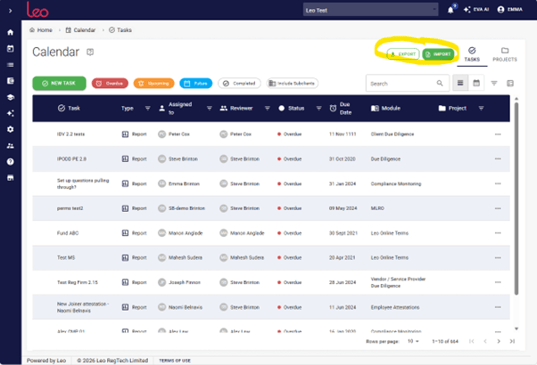
- Clicking on the Export will download the data into an Excel file.
Note: All of the Tasks and Projects information will be downloaded.
If you have the relevant permissions, you can also click on the ‘Include Subclients’ and those you have permission to see in Tasks and Projects will also be exported to the Excel file:

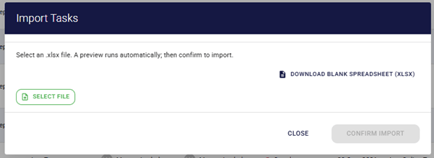
- Clicking on the ‘Import’ button will open a new dialog box:
- Here you can choose to either select an existing file or download a blank spreadsheet.
- Clicking on the ‘Select File’ button will take you to the ‘open’ dialog on your device and enable you to select the relevant Excel spreadsheet.
Note: We recommend that you download our black spreadsheet to match our fields and then be able to import all data correctly.
How to Import from an existing Excel Sheet
Once you have selected the Excel spreadsheet to upload, Leo will perform a validation to ensure that there are no duplications etc. and you will see a dialog window showing you the OK, SKIPPED and ERROR rows.
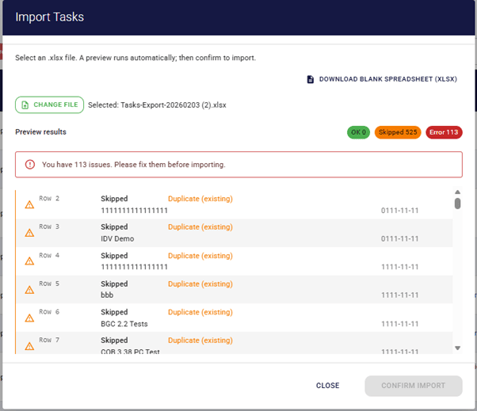
NOTE: The dialog is the same for Tasks and Projects. Any errors will require fixing in your Excel Spreadsheet and you will need to re-import before the ‘Confirm Import’ button activates (it will turn green). The kinds of errors that Leo will show are in the dialog box with a row number to enable you to easily fix the data e.g. a deactivated user
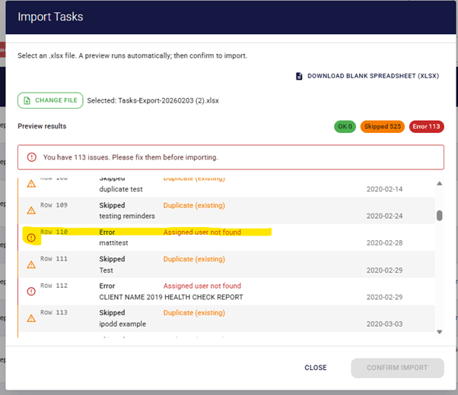
If you wish to see the errors, simply click on the coloured icons to turn them off (just an outline) or to enable them (fully filled in).
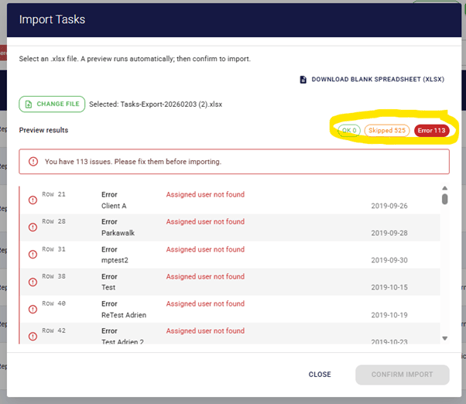
Skipped means that the Task or Project already exist and therefore Leo will ‘Skip’ importing it.
If there are no errors, or when the errors are resolved, the ‘CONFIRM IMPORT’ button will turn green allowing you to do the import.
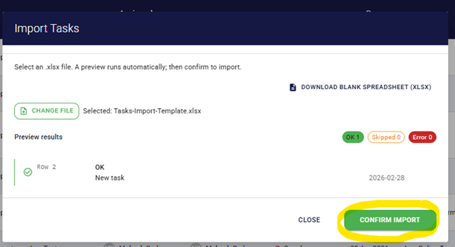
Click the green ‘Confirm Import’ button and your Tasks and Projects will be added to the Leo Calendar feature.